

proDAD Heroglyph V4 – ビデオタイトルに欠かせないソリューション
Heroglyph V4
あなたの映像、私たちのツール・・・可能性は無限大
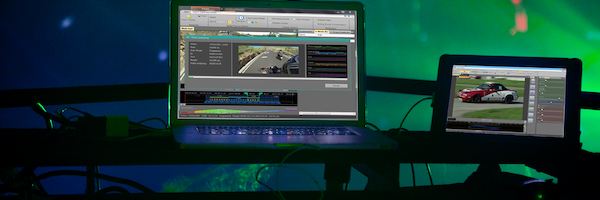
Heroglyph V4の多様な新しい可能性を体験してみてください。 プロフェッショナルなビデオタイトル、ローワーサード、クレジット、トラベルルート、手書きアニメーションなどをこの驚くべきツールで作成してください。あなたのプロジェクトをパーフェクトに仕上げます。エフェクト、アニメーション、ユニークなフォントなどのコンビネーションは無限で、今までよりさらに簡単にプロフェッショナルな結果をもたらします。 新しいユーザーインターフェースのHeroglyph V4 は他のビデオタイトルソリューションに比べ、ワークフローを非常に簡素化しました。そしてプロジェクトの変更はリアルタイムフル解像度のプレビューですぐにご覧いただけます。- Heroglyph V4にだけできること!
ビデオ | すべての動画 以下の動画

Sample route animation

Automatic Videowall

Lower Third in intro

Individual intro

Trailer Sample

Slideshow variation

Videowall with puzzle effect

Lower Third Template

Lower Third & Trailer

Title fade-in by handscript animation

Samples topic wedding

Self-drawing handscript

Trailer sample

Fully automated handscript and symbol drawing

Sample template

Sample of combined slideshow & route animation and handwriting

One of hundreds of title templates

Another example of hundreds of title templates

Sample of travel route animation

Workshop Reiserouten
Tutorial route animation (German language)

New Fontdesigns

Videowall & Handwriting

Wedding template sample

Slideshow & Handscript Animation

Fontdesigns
機能
-
NLEプラグイン(64ビット & 32ビット)
-
スタンドアローンアプリケーション
-
トラベルルートアニメーション
-
自動手描き
-
トレイラーアシスタント
-
ローワーサードアシスタント
-
ビデオウォールアシスタント
-
スライドショーアシスタント
-
詳細なデザインカスタマイズ
-
詳細なアニメーション効果カスタマイズ
Heroglyph V4はNLEでもスタンドアローンプログラムでもご利用いただけます
Heroglyph V4はAdobe®, AVID®, Corel®, Grass Valley®, Magix, Sony® (32-bit & 64-bit plug-ins可能)のノンリニア編集ソフトのプラグインとして組み込まれています。またあなたの編集プログラム、DVDビデオツールやプレゼンテーションによってはプラグインインターフェースがまだご利用いただけないこともありますので、その場合はHeroglyph V4スタンドアローンアプリケーションがご利用いただけます。
It’s your choice! Heroglyph V4 integrates seamlessly as a plug-in with NLE's by Adobe®, AVID®, Corel®, Grass Valley®, Magix, and Sony® (32-bit & 64-bit plug-ins available) or you just use Heroglyph V4 as stand-alone application.
ピクチャ | すべての画像 以下の写真
さらに詳しい情報
- バージョン比較
- システム要件
- Plug-Ins
| Features | Heroglyph V4 PRO | Heroglyph V4 LE | Heroglyph V4 PRO SE-Version |
| NLE Plug-ins (64-bit & 32-bit) | ✔︎ | ✔︎ | without Adobe and Grass Valley EDIUS |
| Standalone appication | ✔︎ | ✔︎ | ✔︎ |
| Travel Route Animation | ✔︎ | ✔︎ | ✔︎ |
| Auto-generated Handscript | ✔︎ | ✔︎ | ✔︎ |
| Trailer Assistants | ✔︎ | ✔︎ | ✔︎ |
| Lower-third Assistant | ✔︎ | ✔︎ | ✔︎ |
| Video Wall Assistant | ✔︎ | ✔︎ | ✔︎ |
| Slideshow Assistant | ✔︎ | ✔︎ | ✔︎ |
| Comprehensive Design Customization | ✔︎ | - | ✔︎ |
| Complete Animated Effects Customization | ✔︎ | - | ✔︎ |
| Yen 29800 |
Windows 32-Bit および 64-Bit 用 Vista, Win7, Win8, Win8.1, Win10, Win11, 2GB-memory, recommended: i7-cpu, 6 GB memory
Adobe
- Adobe After Effects CC 2014 – CC 2019
- Adobe Premiere CC 2014 – CC 2020
Pinnacle Studio
- Pinnacle Studio 14 - 25 Information
Grass Valley K.K.
- Grass Vally Edius NEO 3.x
- Grass Vally Edius 6.0 - 10
- Canopus Edius 6 / NEO 3 Update Information
Avid
- Avid Studio 2011 Importent Information!
Magix
- MAGIX Video deluxe 15 - 18
- MAGIX Video deluxe 2013 - 2022
- MAGIX Movie Edit Pro 15 - 17
- MAGIX Video Pro X1 - X13
- Vegas Pro 13 - 18
- Vegas Movie Studio 14
Corel
- Corel VideoStudio Pro X4 - X10
- Corel VideoStudio Pro 2019